KEY TAKEAWAYS
- Most hacked WordPress sites are compromised through outdated or abandoned plugins and themes, weak admin passwords, or insecure hosting, not through WordPress core itself.
- Updates, fewer plugins, strong logins with two-factor authentication, a web application firewall and offsite backups block the large majority of attacks.
- Security also protects SEO: an infected site can be flagged by browsers and lose rankings overnight.
In this guide
WordPress runs a very large share of the world’s websites, which makes it a constant target for automated attacks. The core software is actively maintained and secure when kept up to date. The real risk sits in the ecosystem around it: thousands of plugins and themes of varying quality, reused passwords and poorly configured hosting.
These twenty steps are the hardening baseline we apply to every WordPress site we build or manage. Work through them in order; the first ten deliver most of the protection.
How WordPress sites get hacked
Attackers rarely target a site personally. Bots continuously scan for known vulnerable plugin versions, try common passwords against login pages and probe for exposed files. Once inside, they typically inject spam pages, redirect visitors, steal customer data or plant malware. Because the attacks are automated, closing known weaknesses removes you from the easy target list.
Updates and plugins
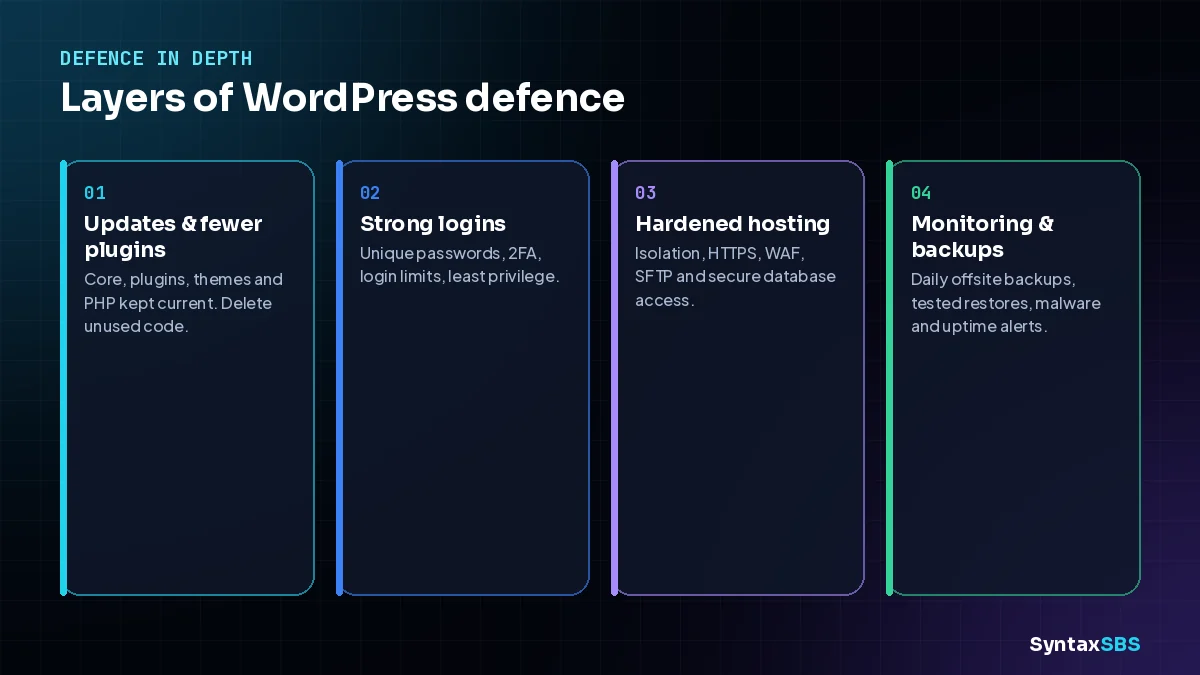
1. Keep WordPress core updated
Leave automatic minor (security) updates enabled and apply major releases after a quick check on a staging copy.
2. Update plugins and themes weekly
Plugin vulnerabilities are the most common entry point. Enable auto-updates for trusted, well-maintained plugins and review the rest weekly.
3. Delete what you do not use
Deactivated plugins and unused themes can still be exploited if their files remain on the server. Delete them completely. Keep one default theme as a fallback.
4. Install only well-maintained plugins
Before installing, check when the plugin was last updated, how many active installs it has, and whether the developer responds to support threads. Avoid “nulled” premium plugins from unofficial sources; they frequently contain backdoors.
5. Keep PHP current
Run a PHP version that still receives security support. Older versions are slower and no longer patched. Most hosts let you change the version in a few clicks.
Logins and users
6. Use strong, unique passwords
Every account with access to the dashboard, hosting, database or FTP needs a long unique password stored in a password manager.
7. Turn on two-factor authentication
Two-factor authentication (2FA) for all administrators and editors blocks the vast majority of password-based attacks, even when a password leaks.
8. Limit login attempts
Rate-limit or temporarily lock out repeated failed logins to stop brute-force attacks. Many security plugins and firewalls include this.
9. Follow least privilege
Give users the lowest role they need. Writers should be Authors or Contributors, not Administrators. Remove accounts for former staff and agencies promptly.
10. Avoid obvious usernames
Do not use “admin” as a username, and make sure the public display name differs from the login name.
Hosting and server
11. Choose security-focused hosting
Good hosts isolate accounts, scan for malware, keep server software patched and offer automatic backups. Cheap shared hosting with no isolation means a neighbour’s hacked site can become your problem.
12. Enforce HTTPS everywhere
Install an SSL certificate, redirect all HTTP traffic to HTTPS and enable HSTS once everything works. HTTPS protects logins and is expected by browsers and search engines.
13. Add a web application firewall
A WAF filters malicious traffic before it reaches WordPress. A cloud WAF such as Cloudflare also adds caching and DDoS protection, which improves speed at the same time.
14. Use SFTP and secure database access
Replace plain FTP with SFTP, and never expose database admin tools publicly without additional protection.
WordPress configuration
15. Disable file editing in the dashboard
Add define( 'DISALLOW_FILE_EDIT', true ); to wp-config.php. If an attacker gains admin access, they can no longer edit theme or plugin code from the browser.
16. Protect wp-config.php and set correct permissions
Typical permissions are 755 for folders and 644 for files, with wp-config.php more restrictive where your host allows. Block direct web access to sensitive files.
17. Disable XML-RPC if you do not need it
XML-RPC is used by some apps and services but is also abused for brute-force and amplification attacks. If nothing on your site depends on it, disable it.
18. Add security headers
Headers such as Content-Security-Policy, X-Content-Type-Options, X-Frame-Options or frame-ancestors, Referrer-Policy and Strict-Transport-Security reduce the impact of cross-site scripting and clickjacking. Test changes carefully, as a strict policy can break scripts.
Monitoring, backups and recovery
19. Back up daily, offsite, and test restores
Store backups away from your hosting account so a server compromise cannot delete them. Restore a copy to staging every quarter to prove it works.
20. Monitor continuously
Use uptime monitoring, file-change detection and malware scanning. Check Google Search Console’s Security issues report, and set up alerts so you hear about a problem before your customers do.
If your site is already hacked
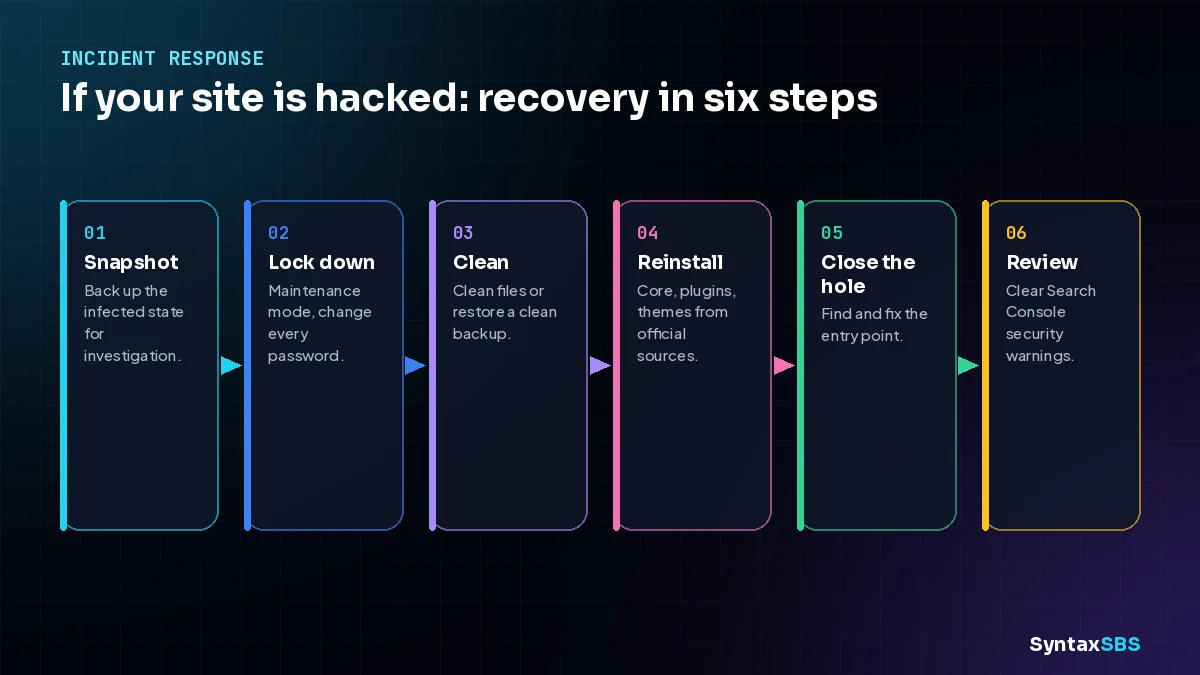
- Take a full backup of the current state for investigation.
- Put the site in maintenance mode and change every password: WordPress, hosting, database, SFTP and email.
- Scan and clean files, or restore from a known-clean backup taken before the infection.
- Reinstall WordPress core, plugins and themes from official sources.
- Find and close the original entry point, otherwise reinfection is likely.
- Check Search Console for security warnings and request a review once clean.
Treat security as maintenance, not a one-time project. Fifteen minutes a week on updates and checks costs far less than a single cleanup.
For a broader view of protecting your whole business, not only your website, see our small business cybersecurity checklist.
Want a secure, fast WordPress website? We build and maintain WordPress sites with these protections from day one.