KEY TAKEAWAYS
- Technical SEO decides whether Google can crawl, index and understand your pages. Great content cannot rank if this foundation is broken.
- Start with Google Search Console: the Pages (indexing) report, Core Web Vitals and sitemaps tell you where to look first.
- On one client site, fixing redirects, the sitemap and over 1,300 thin pages took daily impressions from a few dozen to around 2,000 within days.
In this guide
A technical SEO audit is a health check of everything that affects how search engines discover, crawl, render and index your website. It is the least glamorous part of SEO and often the most profitable, because a single fix, such as a broken redirect or an accidental noindex tag, can unlock traffic across hundreds of pages at once.
This step-by-step checklist is the same process our team uses on client websites, adapted for WordPress, which powers a large share of business websites worldwide.
Tools you need
- Google Search Console: free, and the only source of Google’s own view of your site.
- A crawler such as Screaming Frog SEO Spider (free up to 500 URLs) or Sitebulb.
- PageSpeed Insights for real-user Core Web Vitals and lab diagnostics.
- Google’s Rich Results Test to validate structured data.
- Google Analytics 4 to connect technical issues with traffic and conversions.
1. Crawlability
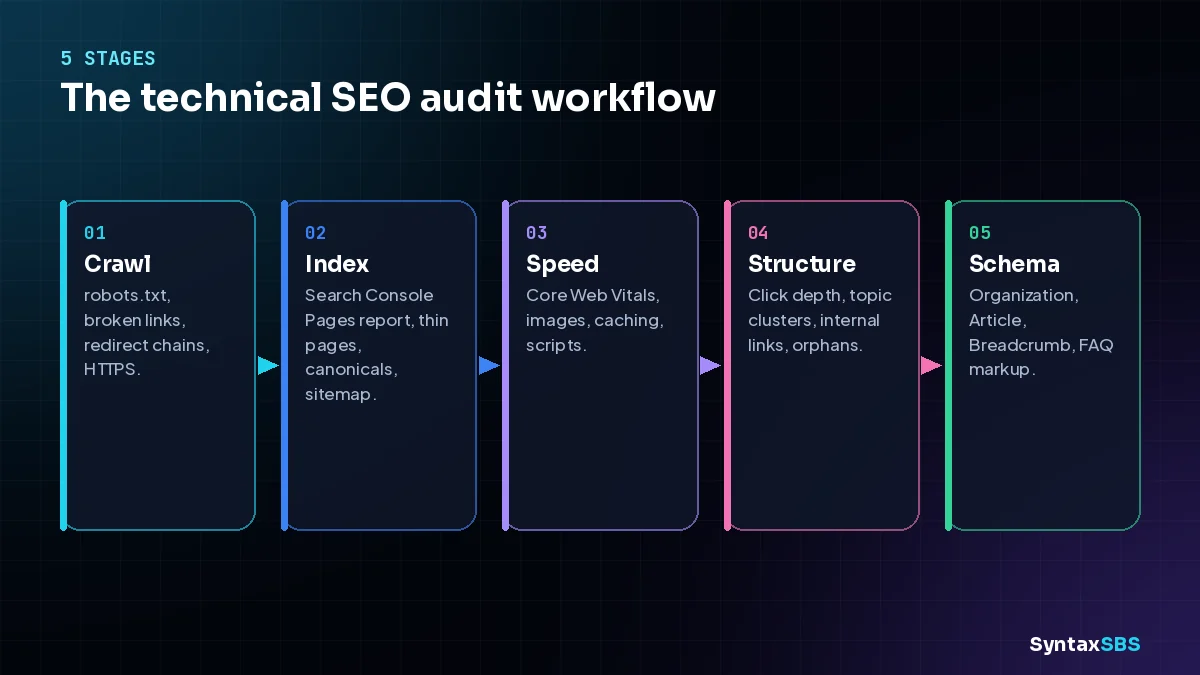
Check robots.txt
Open yourdomain.com/robots.txt. Make sure it does not block important sections, CSS or JavaScript files, and that it points to your XML sitemap. A single misplaced “Disallow: /” left over from development can hide an entire site.
Find broken links and redirect chains
Crawl the site and fix internal links that return 404 errors. Replace redirect chains (A to B to C) with a single 301 redirect directly to the final URL. Chains waste crawl budget and dilute signals.
Confirm HTTPS and one canonical domain
Every version of your domain, http and https, with and without www, should 301 redirect to one preferred version. Mixed versions split authority and confuse indexing.
2. Indexing
Read the Pages report in Search Console
Search Console’s Pages report shows which URLs are indexed and why others are not. Pay close attention to “Crawled, currently not indexed” and “Discovered, currently not indexed”. Large numbers here usually point to thin, duplicate or low-value pages.
Clean out thin and duplicate pages
Tag archives, empty category pages, attachment pages, search result pages and auto-generated listings often create thousands of near-empty URLs. Noindex them, consolidate them, or remove them. In our German case study, removing more than 1,300 thin pages from the index was a major part of the recovery.
Check canonical tags
Each page should declare its own preferred URL with a canonical tag, and parameter or duplicate versions should point to the original. Make sure canonicals never point to redirected or non-indexable pages.
Submit a clean XML sitemap
Your sitemap should list only indexable, canonical pages that return a 200 status. Submit it in Search Console and check that the number of submitted pages roughly matches the number indexed.
3. Speed and Core Web Vitals
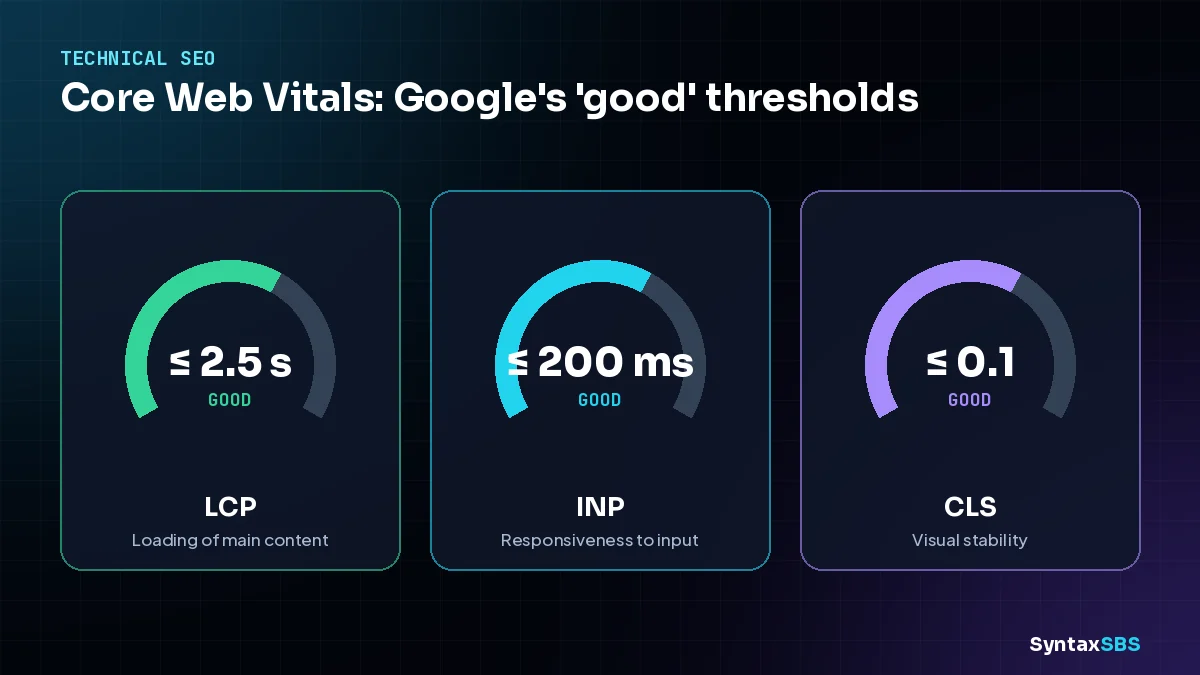
Core Web Vitals measure real-user experience. Google’s “good” thresholds are:
| Metric | What it measures | Good |
|---|---|---|
| LCP (Largest Contentful Paint) | Loading speed of the main content | 2.5 seconds or less |
| INP (Interaction to Next Paint) | Responsiveness to clicks and taps | 200 milliseconds or less |
| CLS (Cumulative Layout Shift) | Visual stability while loading | 0.1 or less |
Common fixes include compressing and resizing images, serving WebP or AVIF, lazy-loading below-the-fold images, preloading the main hero image, reducing heavy plugins and third-party scripts, using page caching and a CDN, and setting width and height on images to prevent layout shift.
4. Site structure and internal links
Important pages should be reachable within three clicks of the homepage. Group related content into clear topic clusters, with a strong pillar page linking to supporting articles and back again. Use descriptive anchor text such as “penetration testing services” rather than “click here”. Look for orphan pages, which have no internal links pointing to them, and connect them to the structure.
5. On-page technical elements
- Title tags: unique, descriptive and roughly 50 to 60 characters, with the main keyword near the start.
- Meta descriptions: unique summaries of about 140 to 160 characters that earn the click.
- One H1 per page, followed by a logical H2 and H3 hierarchy.
- Image alt text that describes the image for accessibility and context.
- Mobile usability: Google indexes the mobile version of your pages first, so content and links must match on mobile and desktop.
- Clean URLs: short, lowercase, hyphenated and readable.
6. Structured data
Structured data helps search engines and AI systems understand who you are and what each page is about. Add Organization and LocalBusiness schema for your company, Article or BlogPosting schema for posts, BreadcrumbList for navigation, and Service, Product or Course schema where relevant. Validate everything with the Rich Results Test and monitor the Enhancements section of Search Console.
Structured data also supports visibility in AI-generated answers. Read our guide to generative engine optimisation to learn how.
7. WordPress-specific checks
- Under Settings, Reading, make sure “Discourage search engines from indexing this site” is unchecked.
- Use a single SEO plugin, such as Rank Math or Yoast, never two at once.
- Noindex attachment pages and thin tag archives.
- Remove unused plugins and themes, which slow the site and add security risk.
- Use a lightweight theme and a caching plugin suited to your hosting.
- Keep WordPress, plugins and PHP versions up to date. Security and SEO are linked: a hacked site full of spam pages can lose rankings overnight.
How to prioritise fixes
Not every issue deserves the same urgency. Rank each finding by impact and effort:
- Critical: anything that blocks crawling or indexing of important pages, such as noindex tags, robots.txt blocks, broken redirects after a migration.
- High: large volumes of thin or duplicate pages, poor Core Web Vitals on key templates, missing canonicals.
- Medium: weak internal linking, missing structured data, duplicate titles.
- Low: minor alt text gaps and cosmetic URL issues.

After fixing, request indexing for the most important URLs in Search Console, then compare impressions, clicks and average position over the following weeks.
Want us to run this audit for you? Get a free technical SEO review with a prioritised fix list.